
Property is not sold at a desk. So this is not a companion app.
Six tabs, built for someone standing at a site gate with one hand free. A call logged in two taps on the way back from the dialler. A check-in that records where you were and when. And when the signal goes — basement, lift, a site with no bars — the day carries on and syncs later with the time and the position it really had.
- Android · no iPhone build
- Six tabs
- 13 call outcomes, two taps
- Works with no signal
- No call-log or contacts permission
- Same sign-in as the web app
Three screens that carry the day
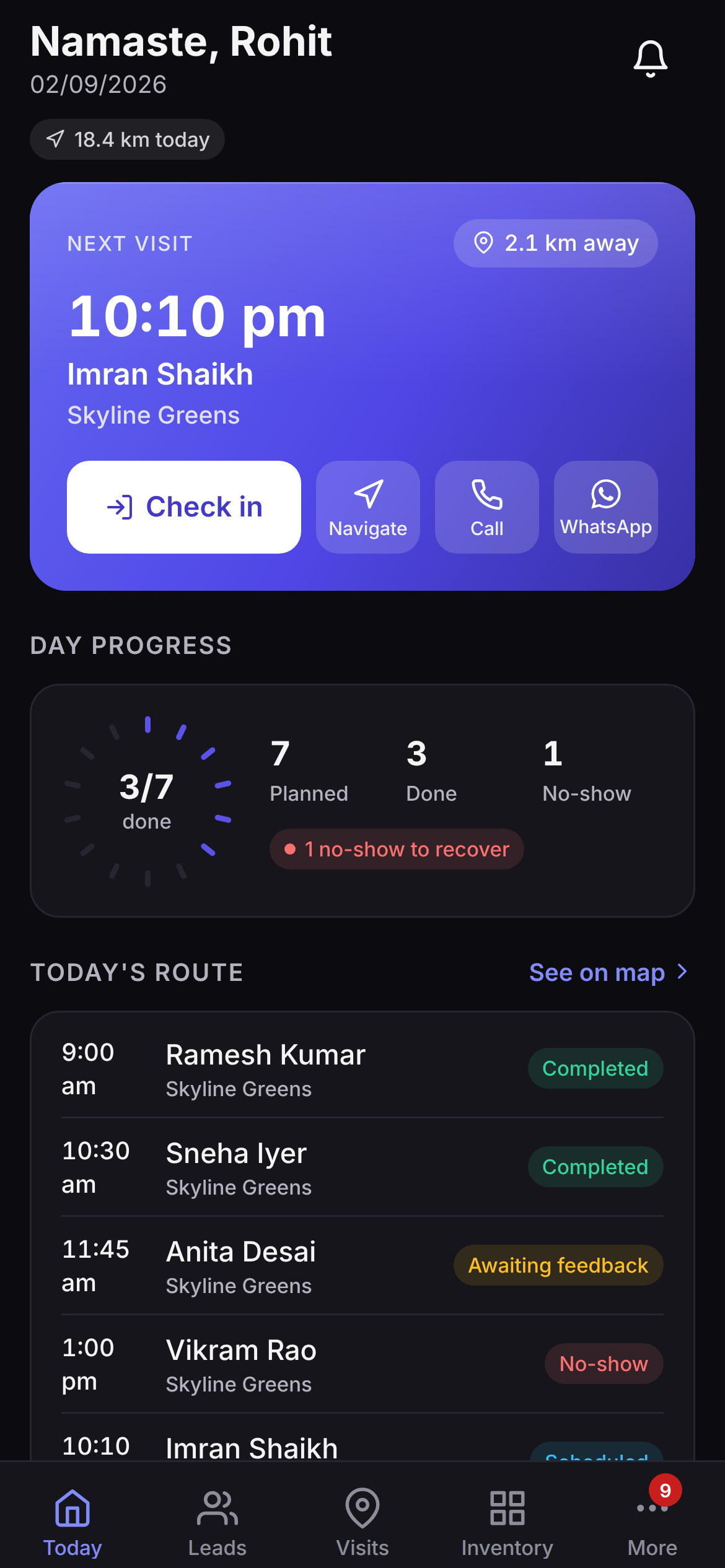
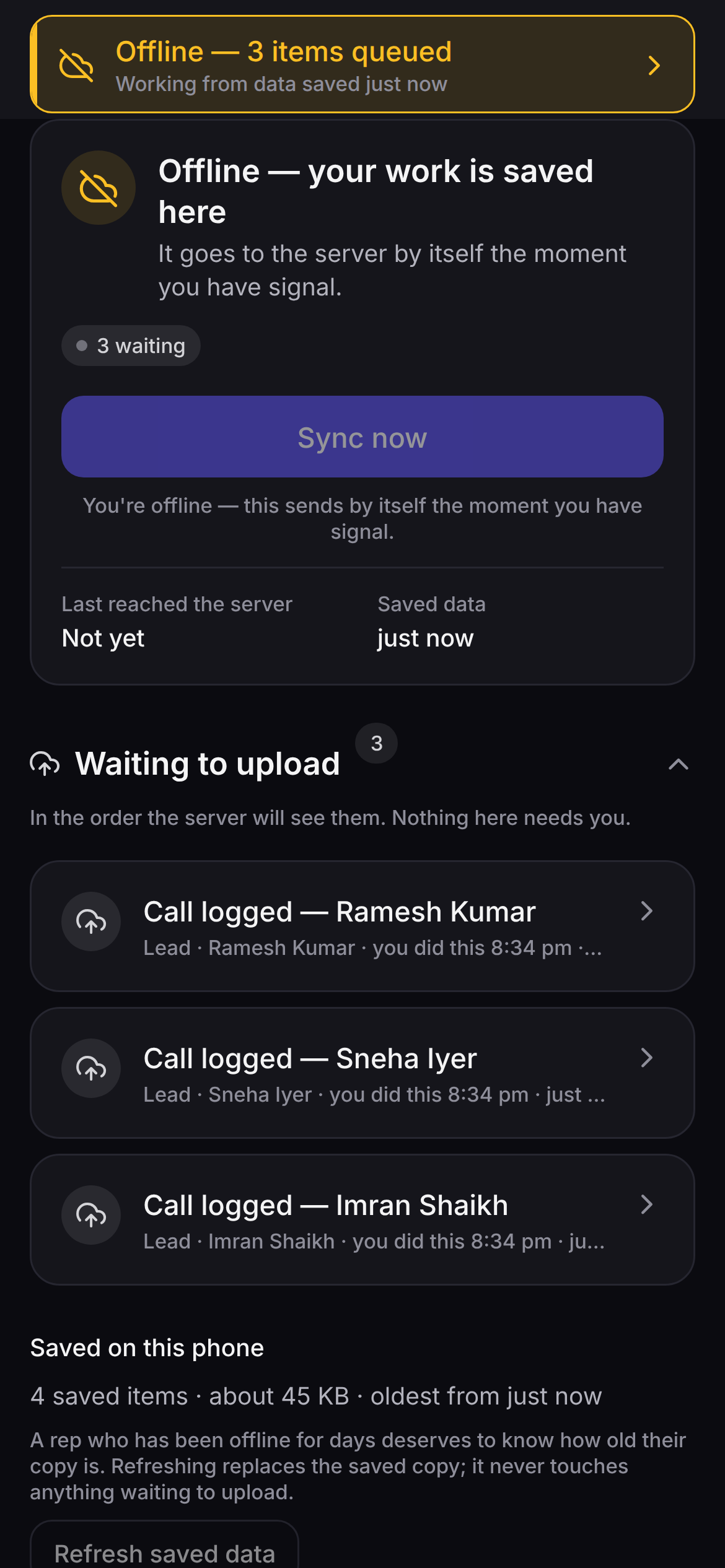
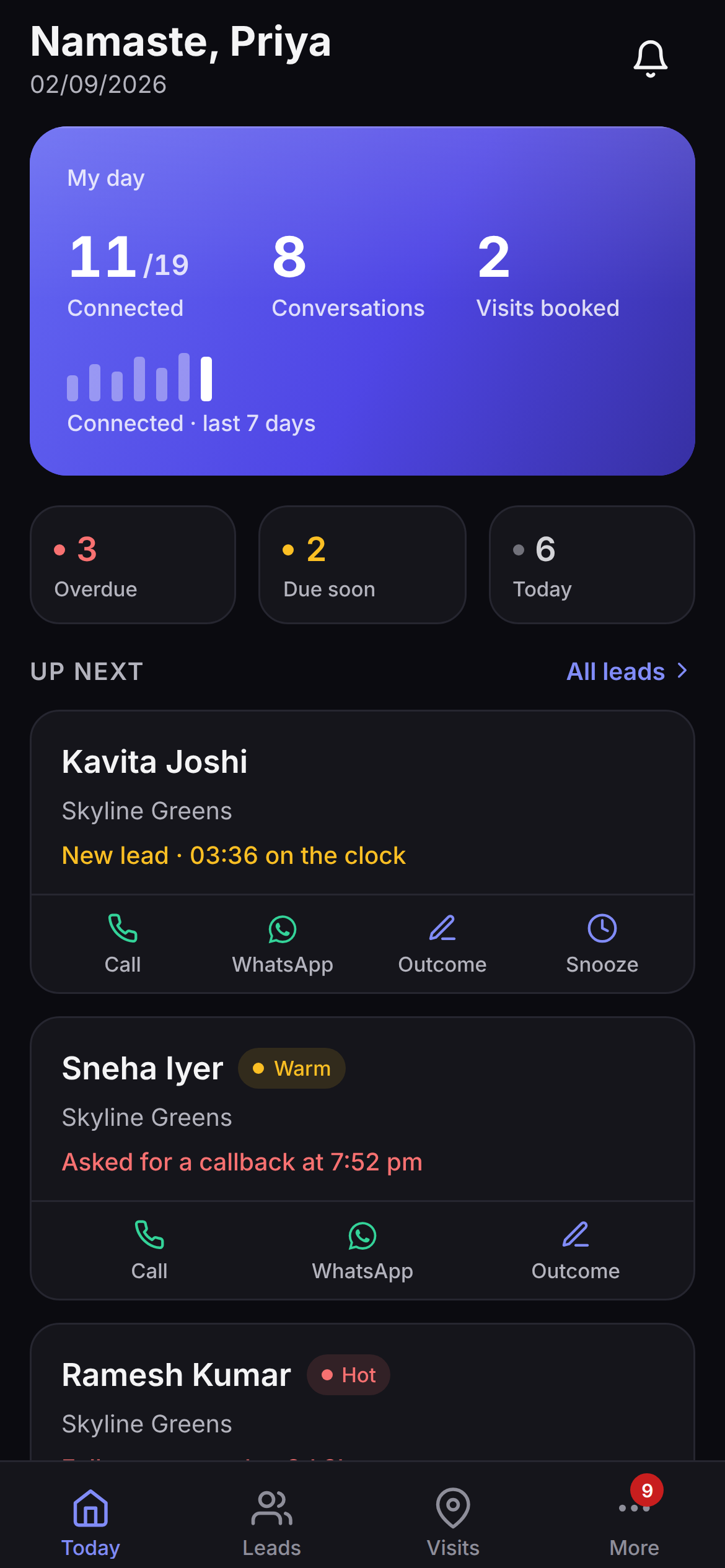
Every screen on this page came out of the app itself, rendering its own code. Nothing here is a mockup, a redraw or a designer's impression. The names, projects and rupee figures in them are sample data — they prove the screen exists, and they are not anybody's results.
Six tabs. That is the whole app.
Not a menu tree shrunk down from the desktop. Six places, in the order a field day uses them — and a tab you have no permission for is not there at all, rather than there and refusing you.
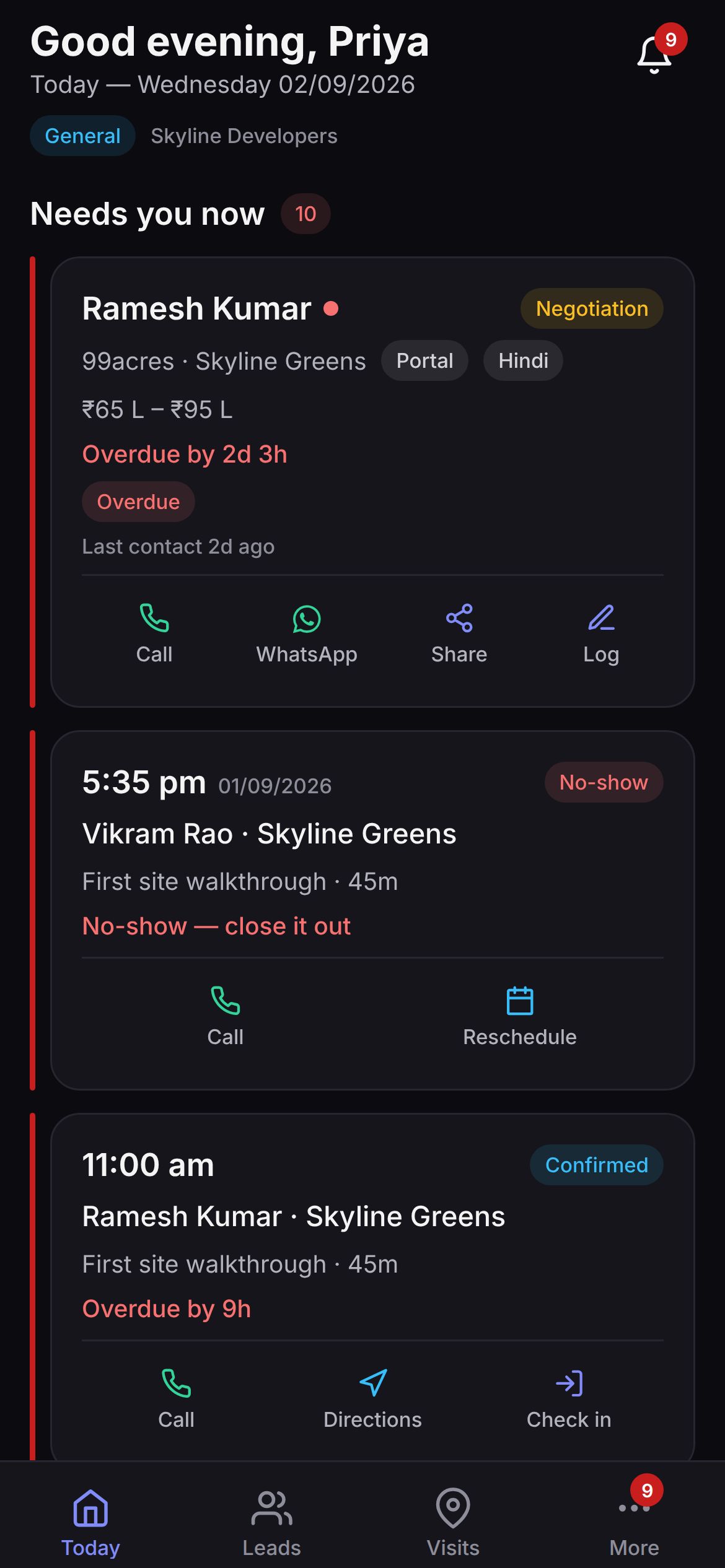
- 01TodayVisits due, follow-ups due, callbacks, and the attribution windows about to close. Every card says why it is on the list.
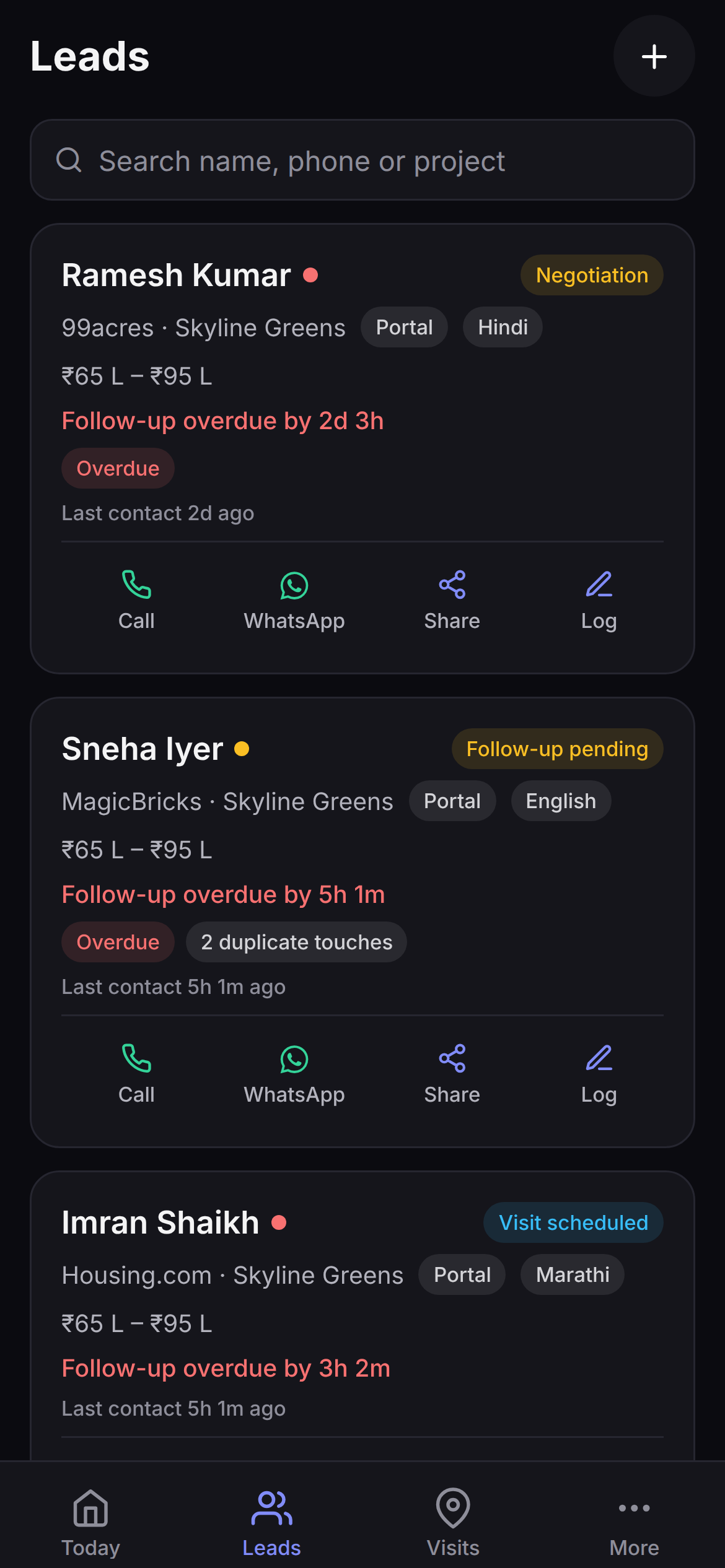
- 02LeadsThe pipeline as a list you can burn through — stage, source, language, budget band, and Call · WhatsApp · Share · Log on every row.
- 03VisitsToday, upcoming, overdue and no-show. Check in at the gate, and finish the visit with structured feedback.
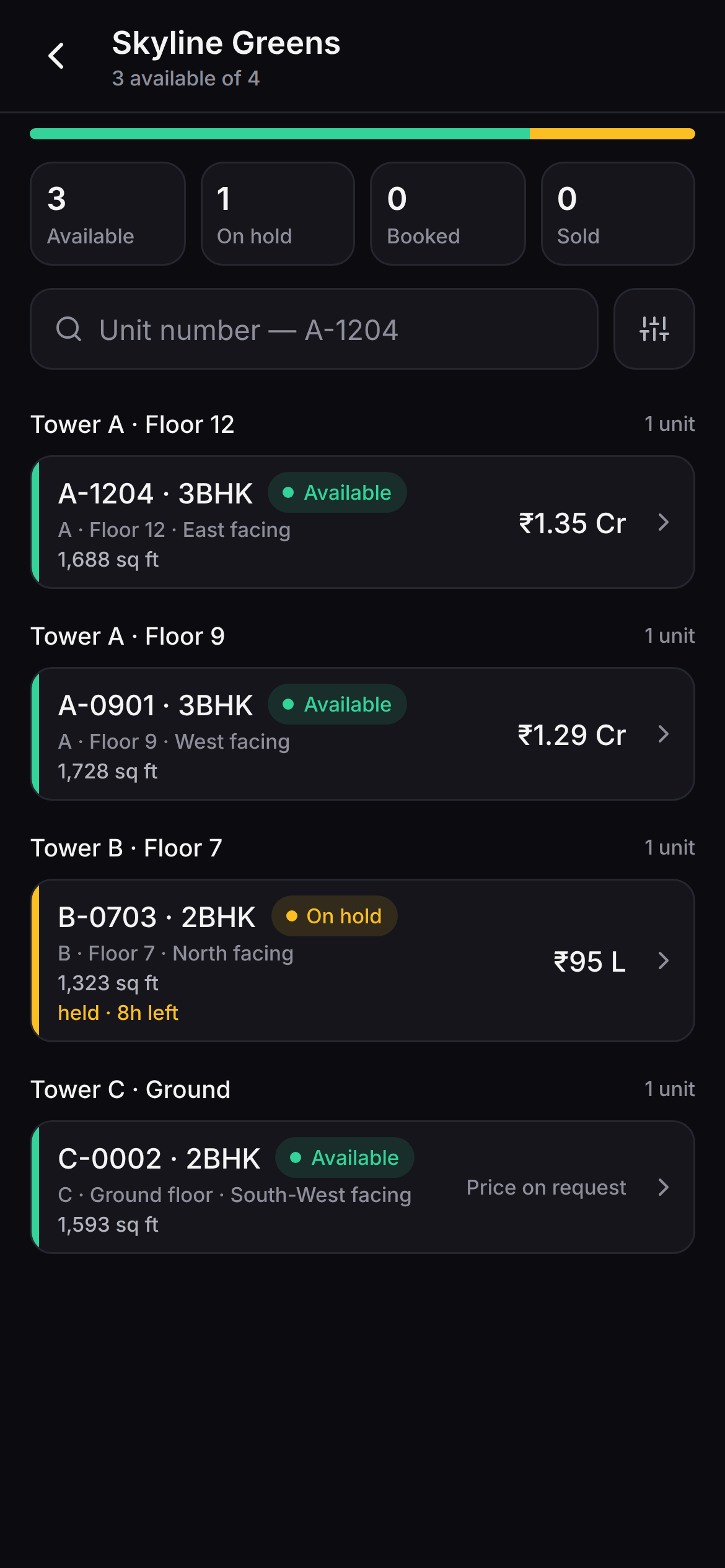
- 04InventoryProjects, towers, floors and units with holds and prices. Read-only by design — a unit is not held from a car park.
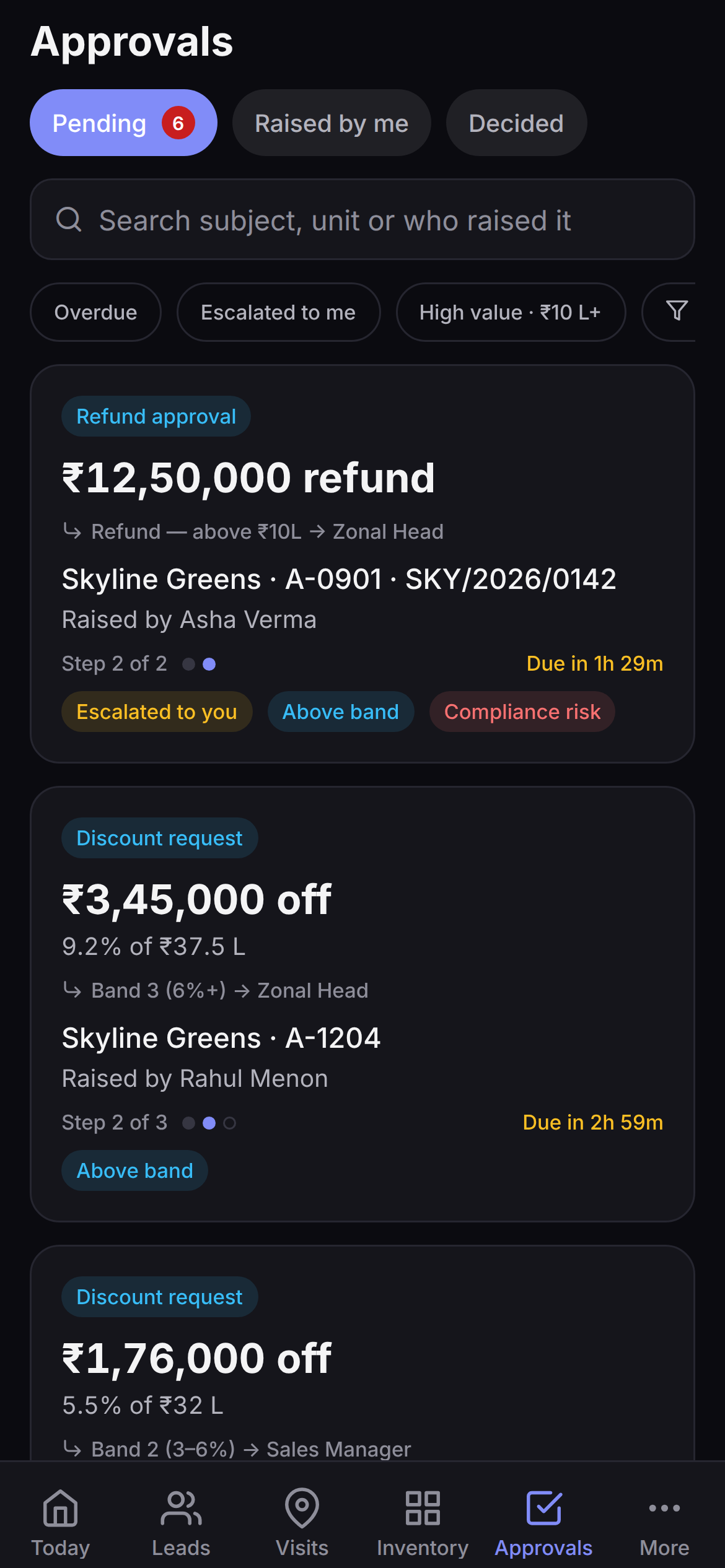
- 05ApprovalsDiscounts, refunds, hold extensions and ten other request types, each with its chain rule, its step and its clock.
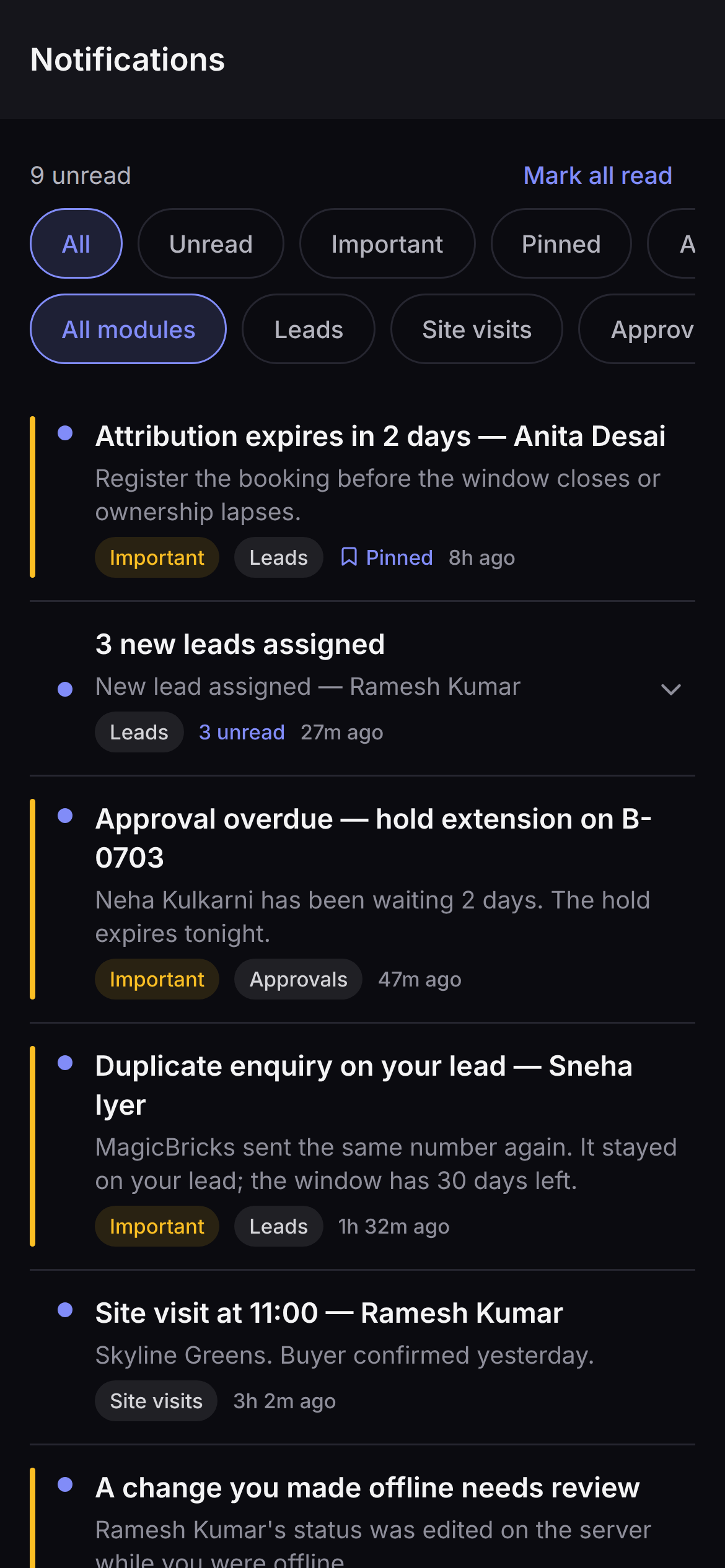
- 06MoreNotifications, sync, conflicts, what the app can see of a call, what it shares about your location, and your access summary.
The day, in the order it actually needs.
Today is where everyone lands, whatever their role. It is not a feed. It is the six things that can go wrong today, sorted: what is urgent, the visits, the follow-ups, the callbacks, the attribution windows about to expire, and what is close to closing.
- Every card says why it is there. "New lead · 03:36 on the clock". "Asked for a callback at 7:11 pm". "Attribution expires in 2 days". Nobody has to guess the ordering, so nobody argues with it.
- Expiring attribution is on the home screen. It is money walking out of the door, and it belongs on a home screen rather than in a report nobody opens.
- Every number is a tap target. A stat lands on the records behind it — and when that section is empty today, the tap still lands somewhere real instead of doing nothing.
- A telecaller and a field agent get different homes. Four role dashboards plus a plain fallback for the seats that do not need one. Presets, not separate products — and they do not lock.
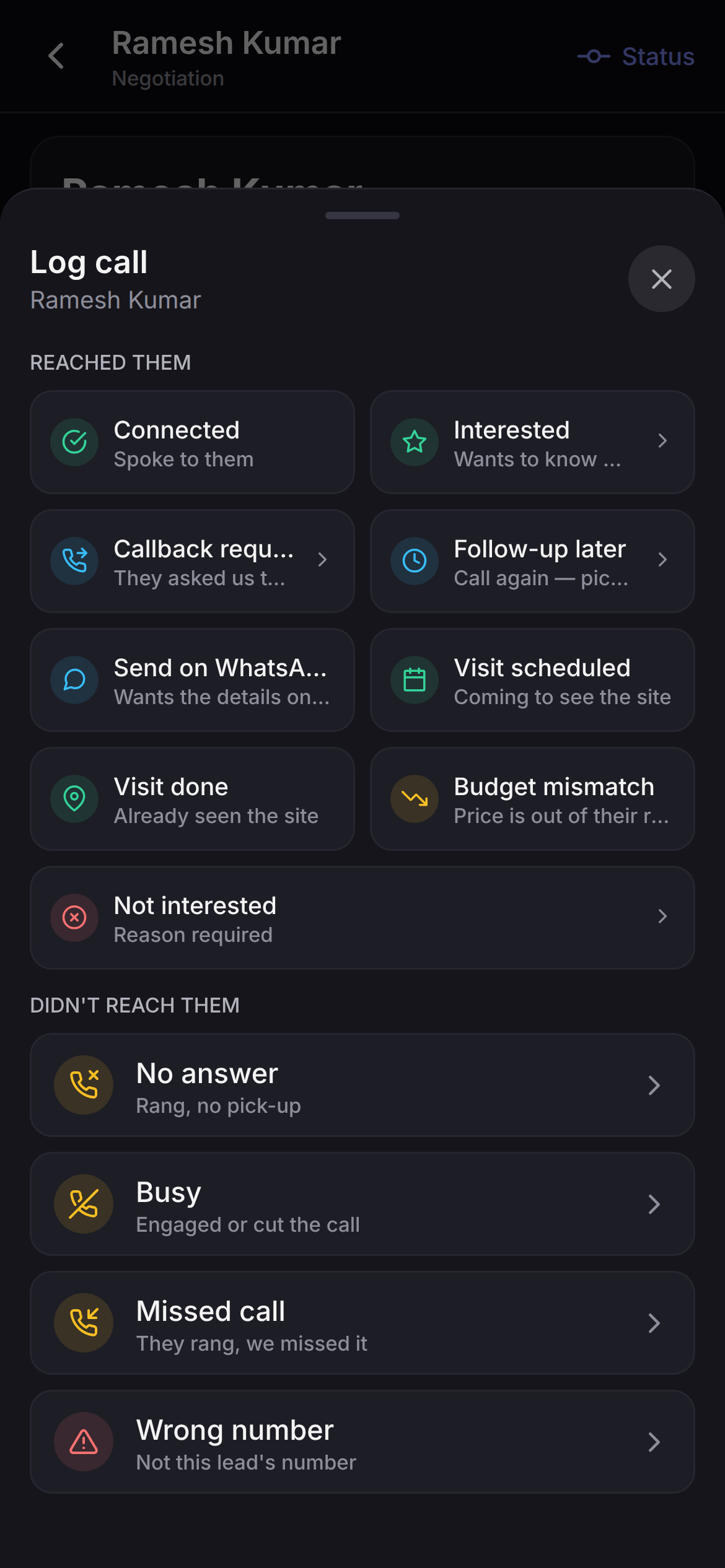
Two taps, thirteen outcomes, and one thing we refuse to do.
Tap Call on the card. The phone dials the way it always does. When you come back, the outcome sheet is already open — wherever in the app you started the call from — and tapping an outcome is the save. No form, no typing, no waiting on the network before the next number.
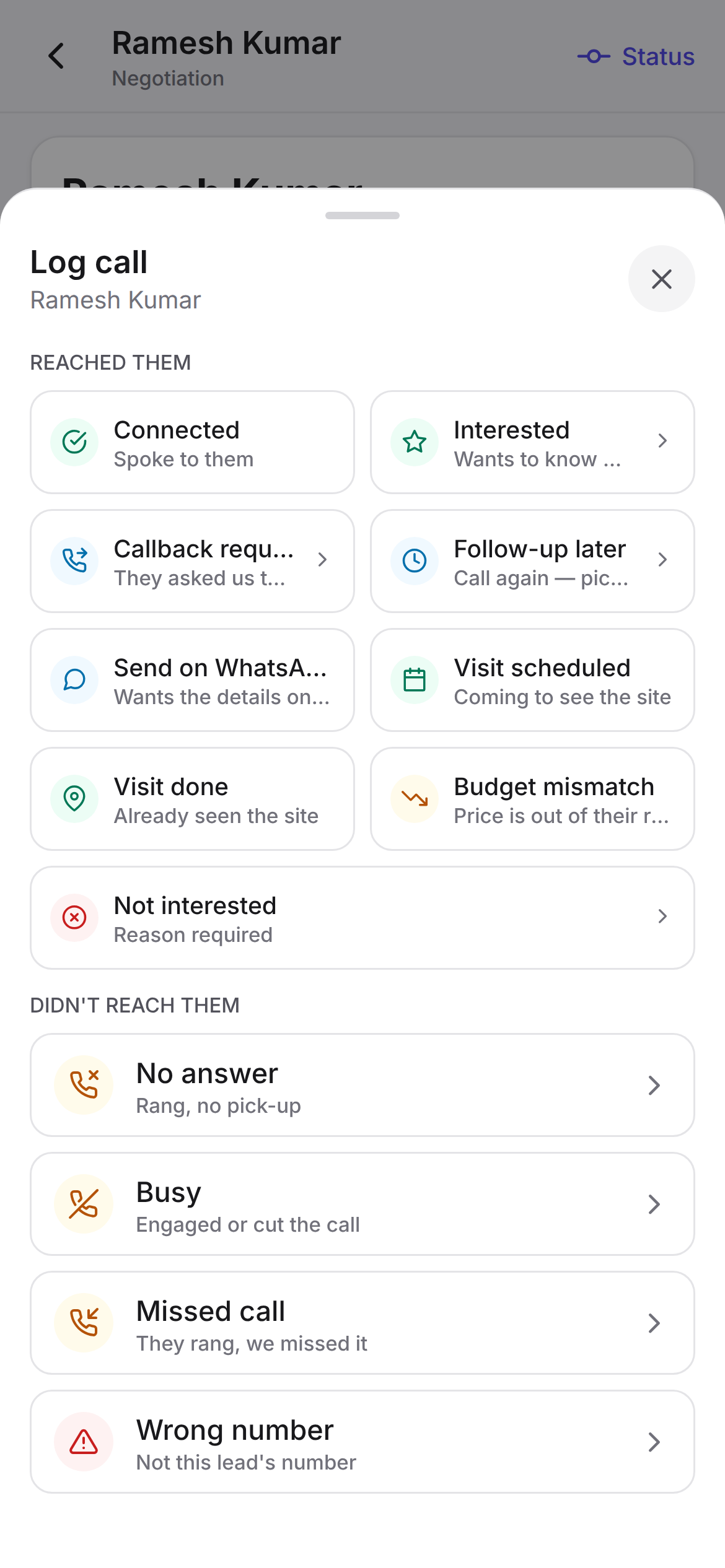
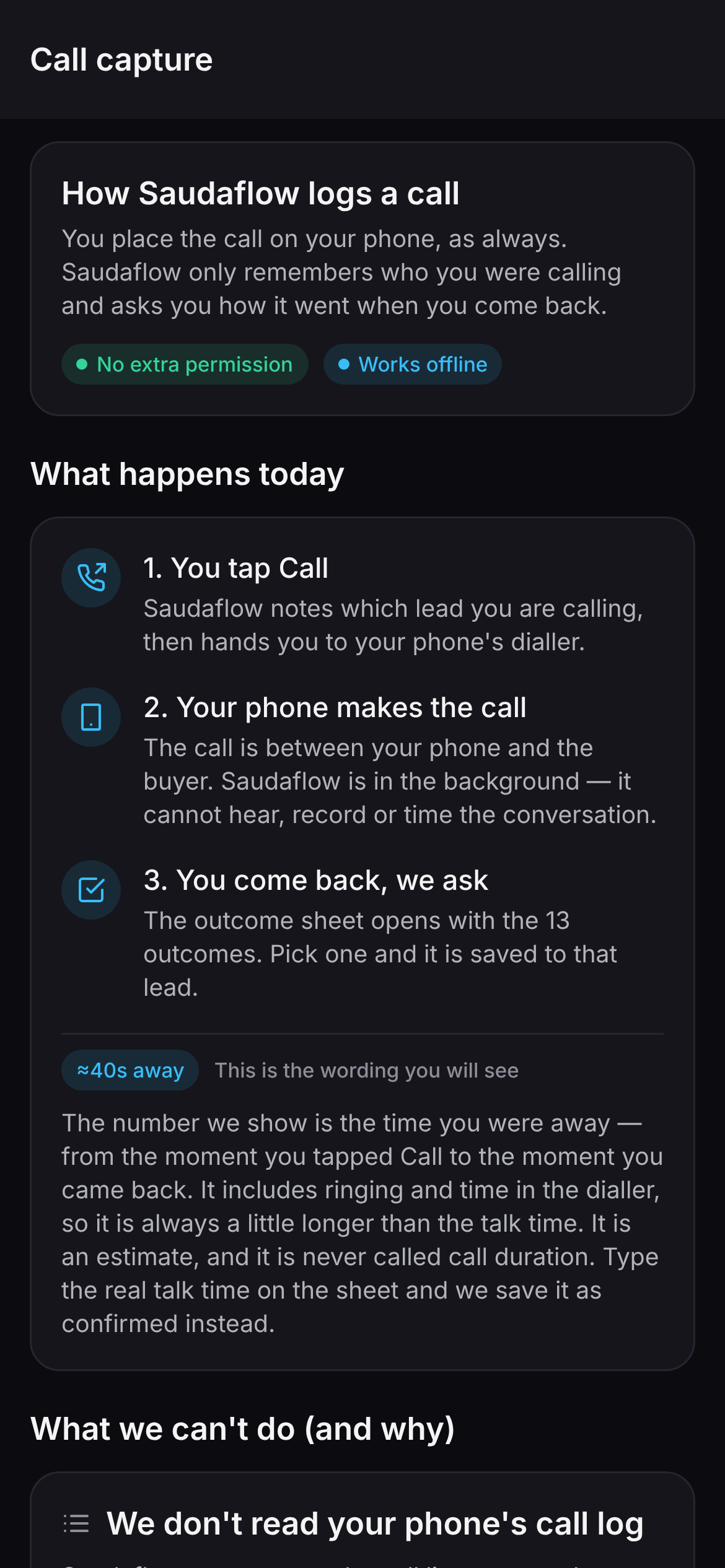
Light and dark are both the app; it follows whatever the phone is set to.
We do not read your phone's call log.
A banner that names the buyer while the phone is still ringing needs the call log, and Google Play grants that permission only to an app that is the phone's dialler or that holds a written exception. We are not asking every person who uses this product for a permission we cannot justify — so the app declares no call-log permission and no contacts permission at all.
You can check it on the handset. The only things this app ever asks your phone for are location, camera, microphone and notifications — and every one of those is asked at the moment you use the feature that needs it.
- The time is an estimate, and it says so. The sheet shows ≈40s away — wall-clock time between leaving for the dialler and coming back, never talk time. It becomes a duration only if the rep corrects it.
- Missed call and Wrong number count as not reached. They are recorded on the not-connected side, so nobody's connect rate is quietly inflated by calls that never connected. That single decision is the difference between a dashboard you can act on and one you learn to distrust.
- Seven of the thirteen ask one more thing. Callback requested wants a time. Not interested wants a reason, and will not save without one. No answer suggests when to try again. The other six save on the single tap and get out of the way.
- It works with no signal. The outcome is queued with the moment it happened, not the moment it uploaded.
Check in at the gate. Close the visit properly.
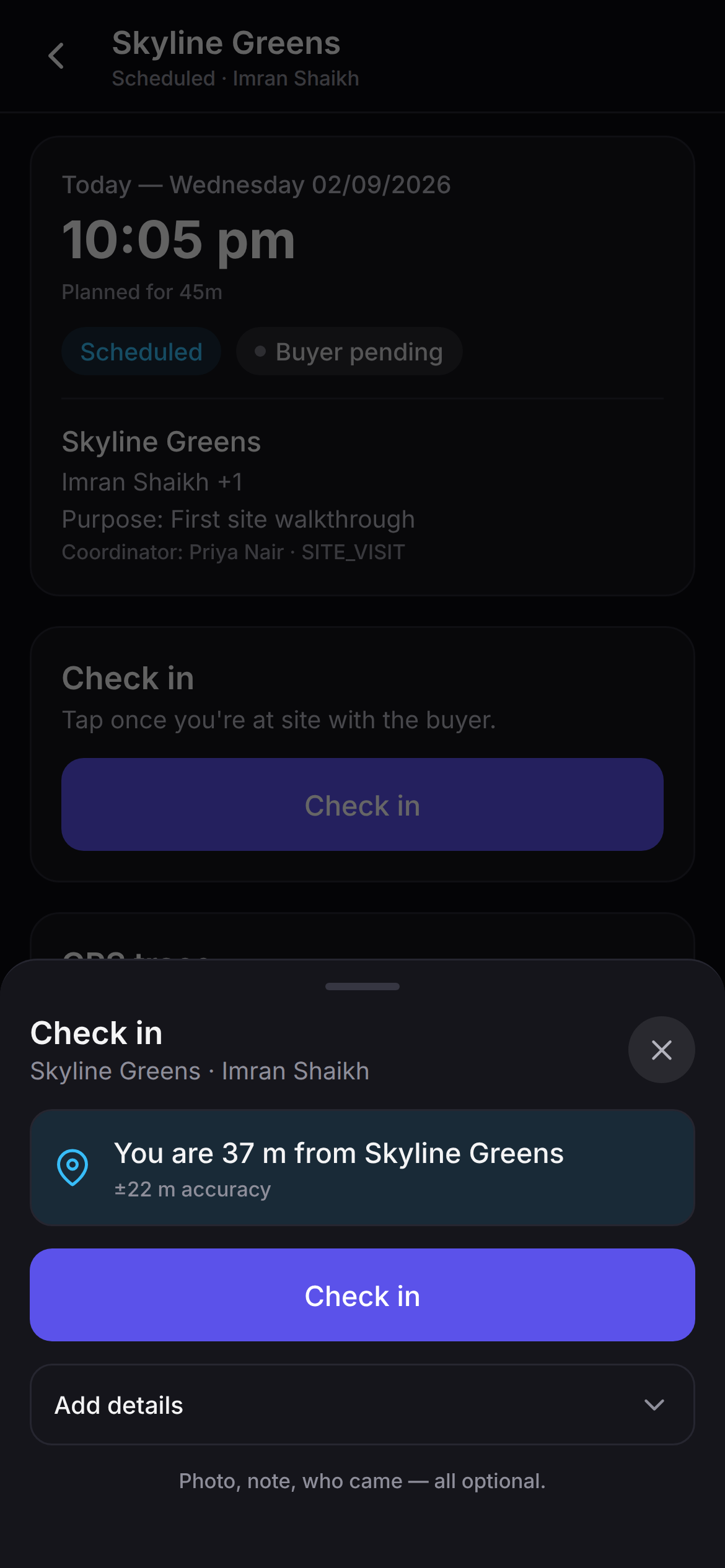
One tap records the coordinates, how accurate the fix was, and the time. A photo, a note and who came along are offered and optional — a rep with a buyer in front of them is not filling in a form.
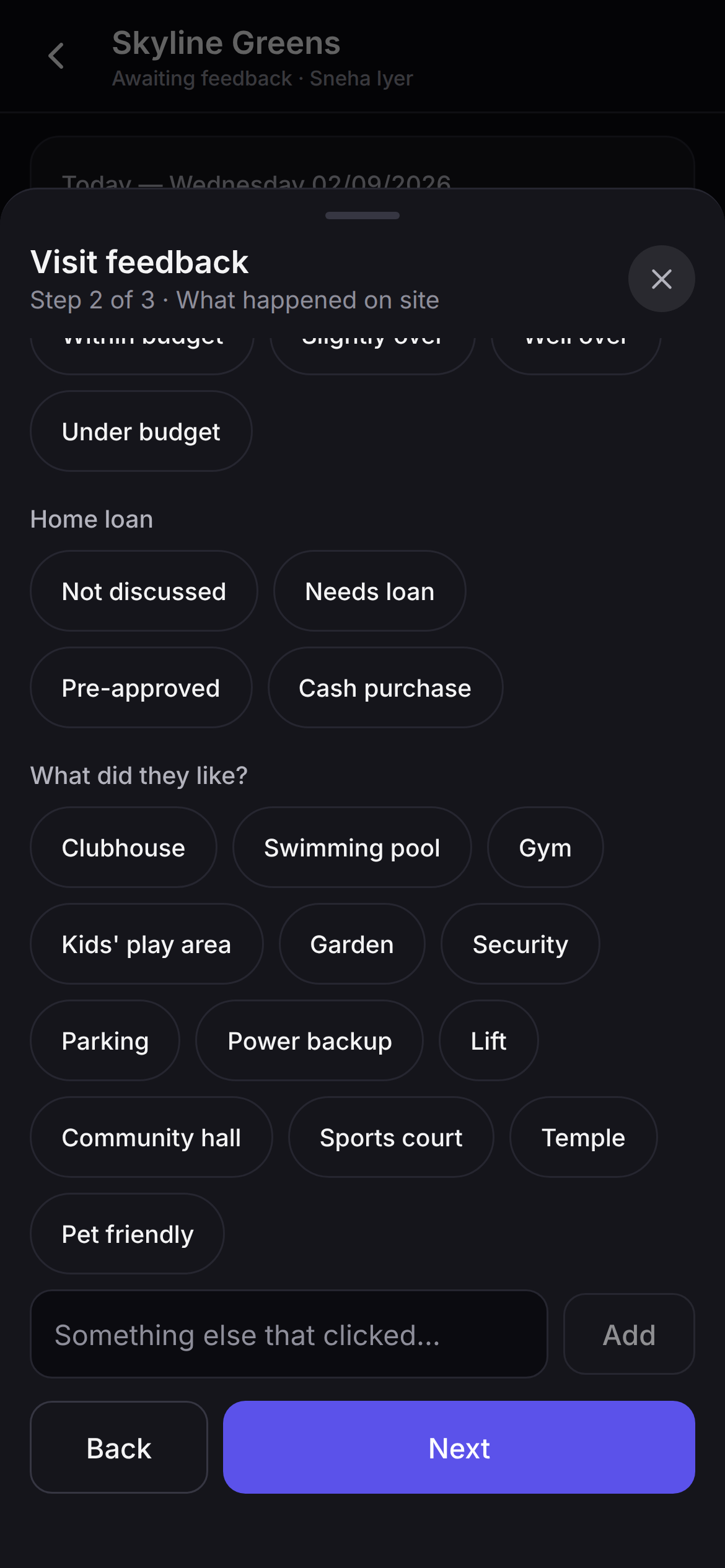
- Feedback is a gate, not a nag. Under the default workspace policy a visit cannot reach Completed until the structured feedback is in: interest, outcome, who actually came, what was shown, what was handed over, and the objection — from fifteen named ones, price and loan eligibility and possession timeline and carpet versus super built-up among them.
- Three steps, built to finish in under a minute. Step one is what a manager needs, step two is what happened on site, step three is what happens next. Only three fields are required, and they are spread so a rep can never be trapped on one.
- "Anything you don't tick is recorded as not shared." The app's own words. A handover list that quietly defaults to yes is how a possession dispute starts.
- A no-show is a routed outcome, not a blank. It goes back into follow-up instead of leaving a visit hanging.
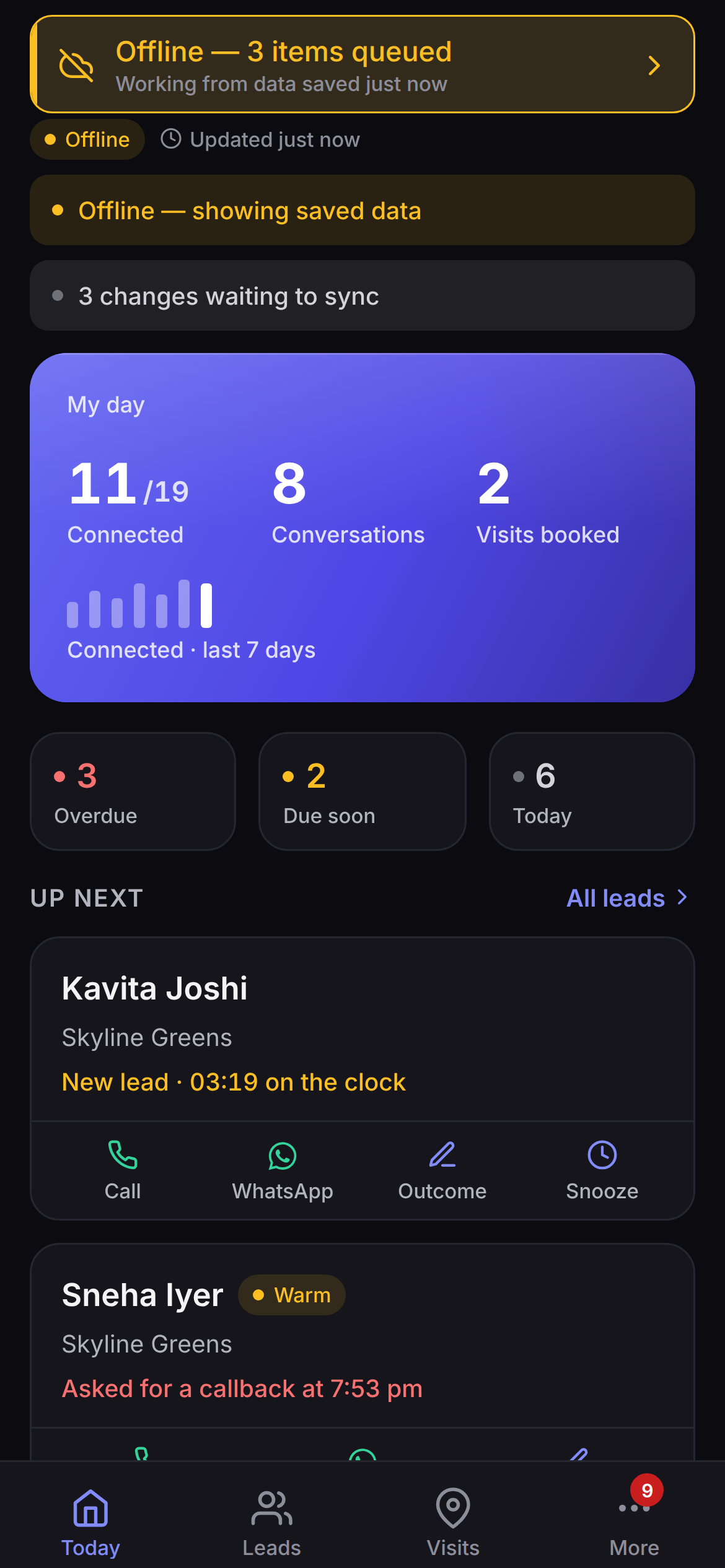
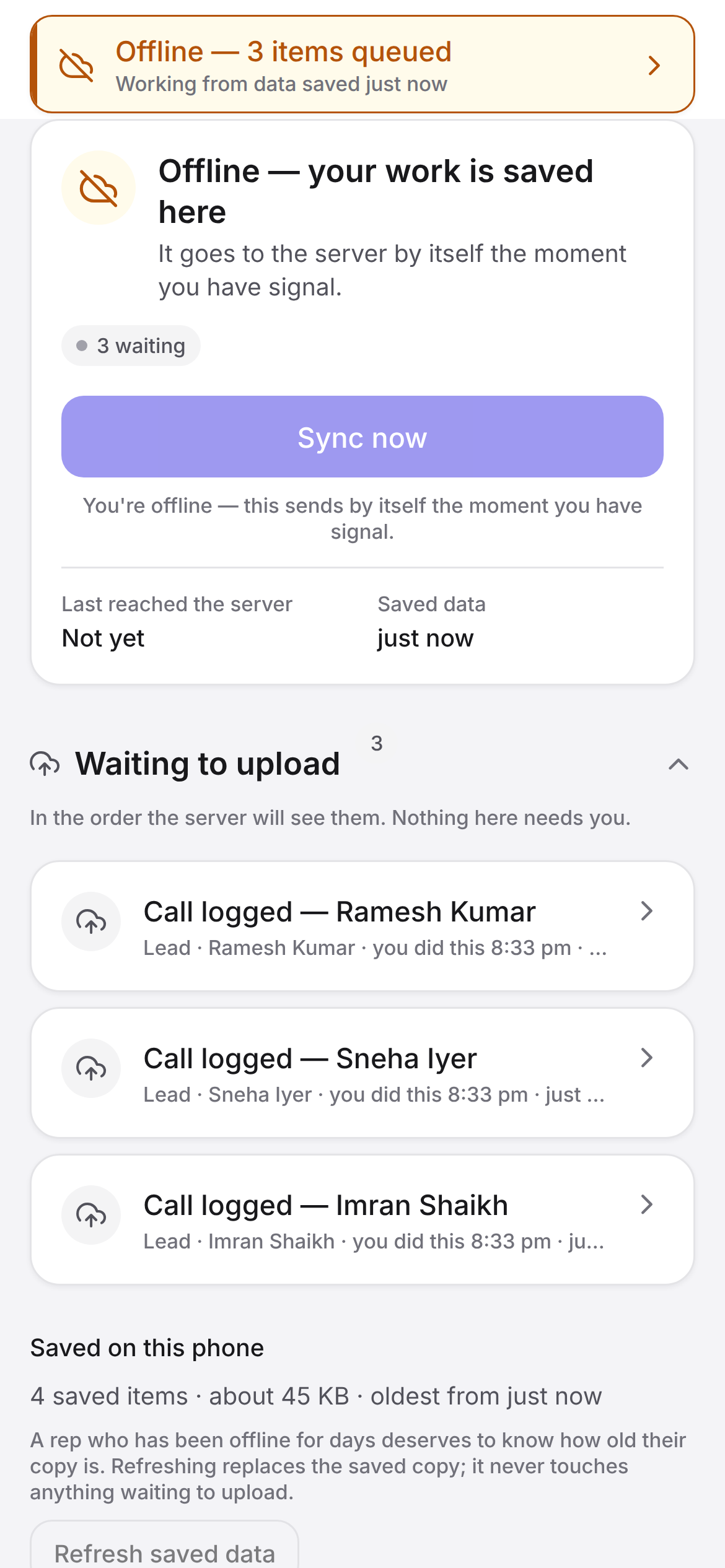
No bars in the basement. The day carries on.
This is most of the reason the app exists as something you install rather than a website on a phone. Offline is not a spinner and a prayer here — it is a queue you can open, read and retry, and a set of rules about what is allowed to happen while nobody can check.
What queues
Call outcomes and notes · voice notes · follow-ups · snoozes · check-ins · check-outs · no-shows · structured visit feedback · lead status changes · shares. Ten kinds, and the list is exhaustive by construction — the app will not build if someone adds an eleventh without classifying how risky it is to replay.
It syncs with the time it really happened
A check-in made at 11:02 that uploads at 15:40 reads 11:02, with its own GPS fix attached — and the server keeps its own receipt time next to it, so neither can be quietly rewritten. The queue replays dependencies first, then in the order things actually happened, one request at a time.
One action, one id
Every queued write gets an id the moment you make it, and carries the same id on every delivery — including the first. A request that times out but actually landed is recognised on the retry instead of writing a second row. Retries back off 30 seconds, two minutes, ten, thirty, then hourly.
Nothing is overwritten quietly
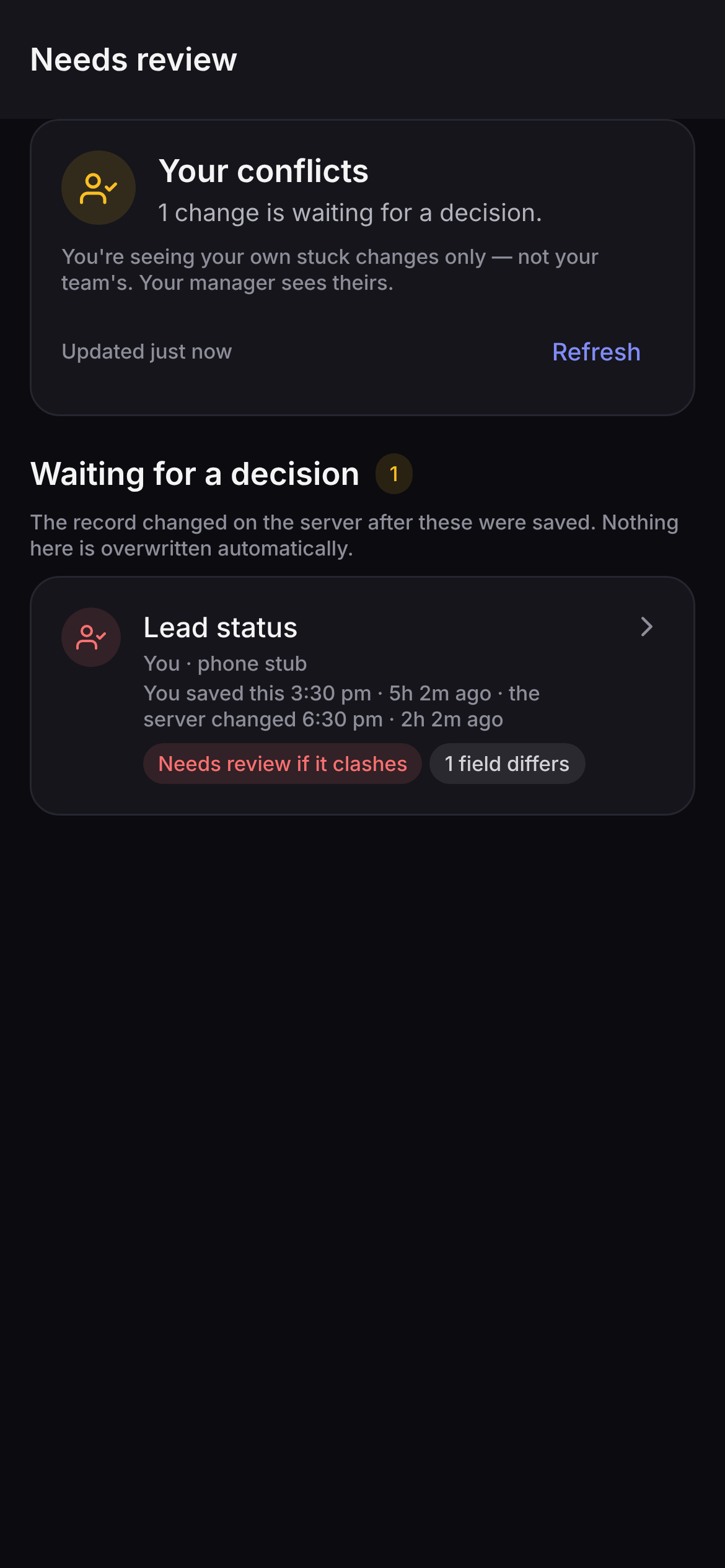
If the record moved on the server while a write sat in the queue, that write is not retried into an overwrite. It becomes a conflict for a human. Ownership, money, inventory, approvals, attribution and compliance can never resolve themselves by last-write-wins, whatever the workspace has switched on.
The sign-off that used to need a laptop.
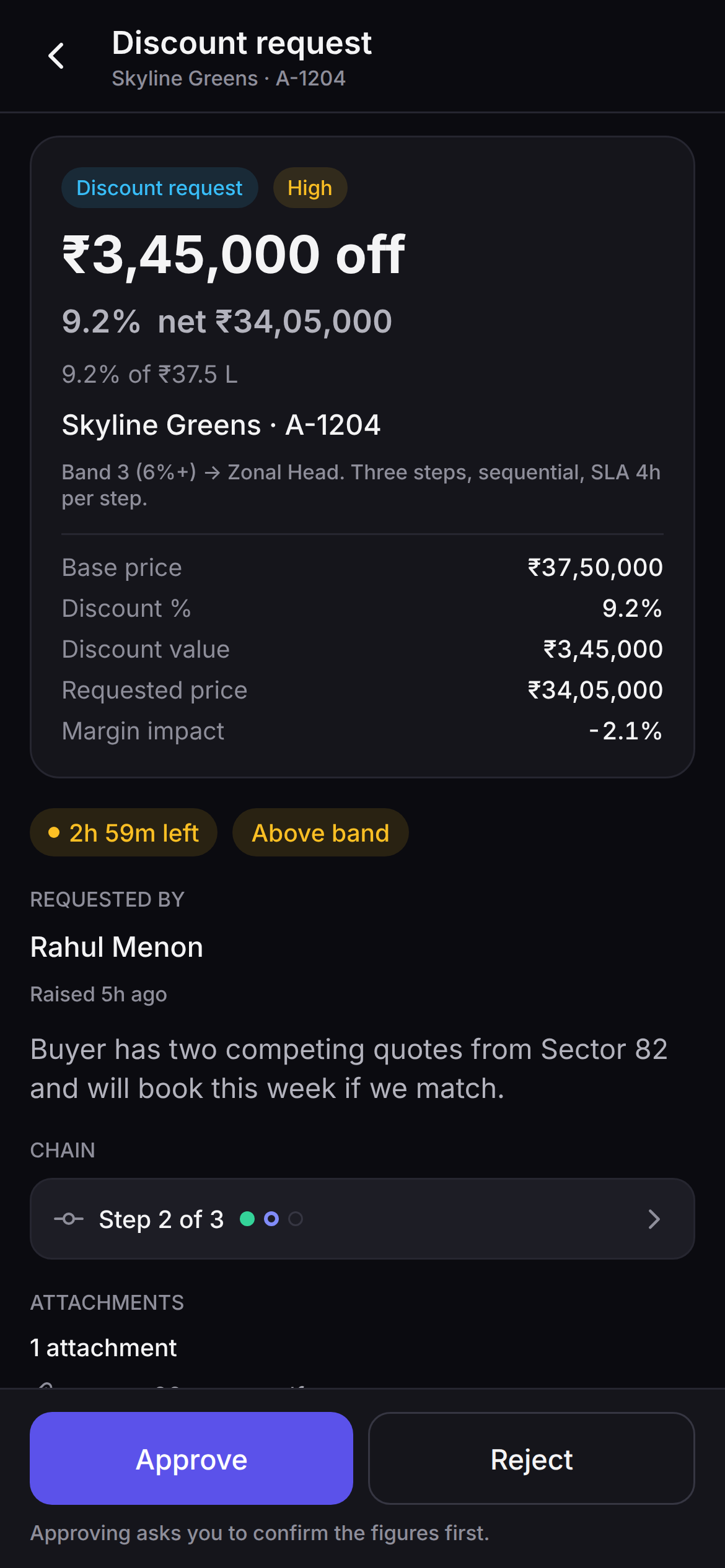
Thirteen request types reach the phone — discount, discount reversal, refund, cancellation, price change, manual price override, hold extension, hold release override, booking reopen, commission exception, marketing content, marketing budget and a general exception. Each arrives with the rule that routed it, which step of the chain it is on, and how long is left.
- The figures are the server's. Discount percentage, net value, margin impact — computed where the data lives, never on the handset. The screen says "Approving asks you to confirm the figures first" because it means it.
- Money is never bulk-decided. You can clear a batch of low-risk requests together; a request carrying a rupee figure has to be opened and decided on its own.
- The chain is frozen on the request. Editing the approval rules tomorrow does not change what is in flight today — the request carries the chain it was raised under.
- A rejection is structured. Breaks policy, margin impact, documents missing, or your own words — so a rejected request tells the next person why, not just no.
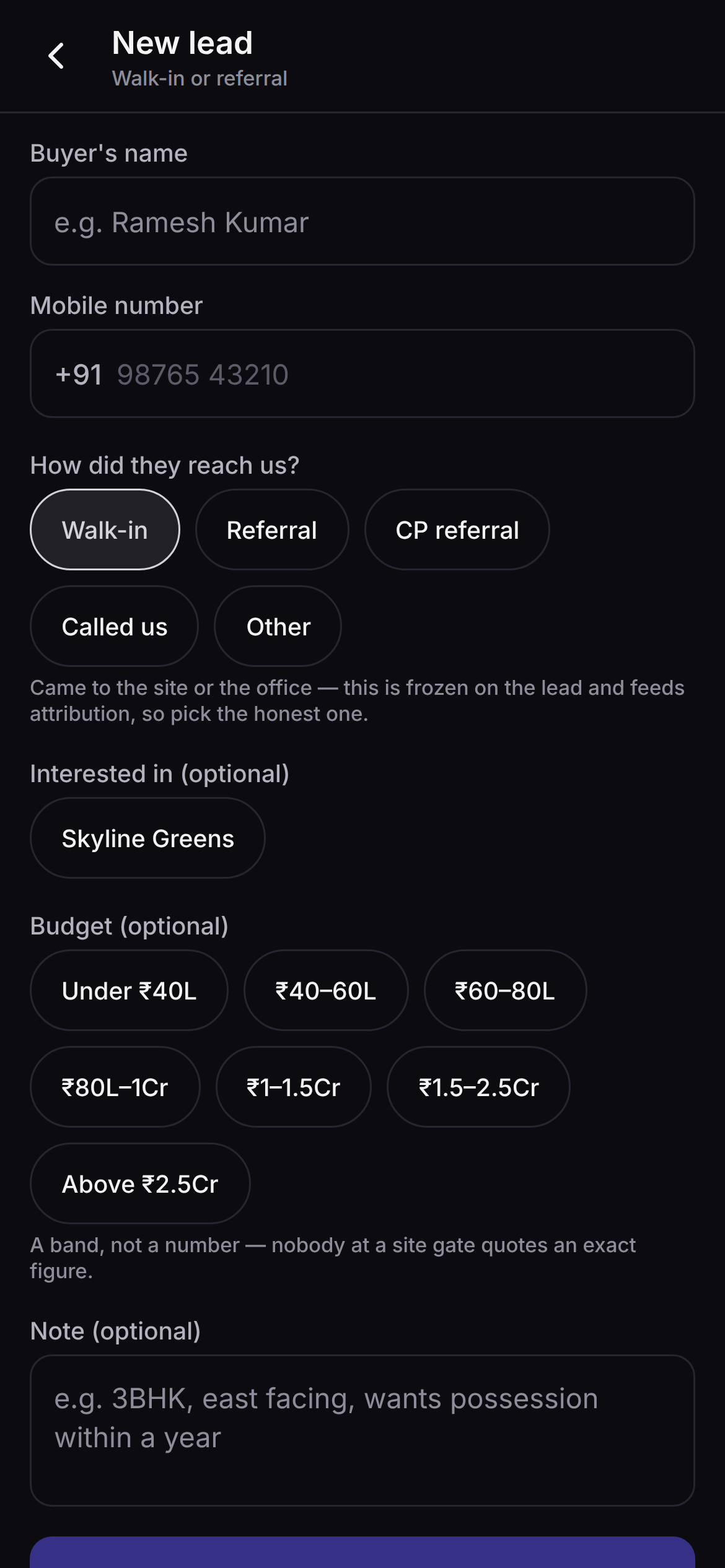
The pipeline, the gate register, the stock and the nudges.
Four more screens a field day runs through, exactly as they render on the phone.
What the phone does not do.
You will find this out in week one anyway. Better here, where you can still price it into the decision — and where you can weigh it against the rest of the page knowing we did not hide the ugly part.
- There is no iPhone build. Not in review, not in beta. Android went first because that is what field teams carry. Everyone else uses the web app, which works properly in Safari — full pipeline, visits, approvals, dashboards, reports. What an iPhone loses is the offline queue and the GPS check-in, both of which need an installed app.
- No map, and we will not show you one. The build we hand out carries no Google Maps key, so a map surface renders empty; the screens that would draw one have never been seen running by anybody here. That is why there is no map picture on this page. Buy the app for the queue and the check-in, not for a map.
- Geofencing decides nothing until a project is pinned. Coordinates are always recorded. Verified, flagged or unverified is a verdict that needs a site pin, set once per project. Until then every check-in at that site reads unverified — accurately.
- Reports, commissions, bookings, payments, documents and settings are web-only. So are the channel-partner portal and Buyer Connect. Those are read, argued over and configured at a desk, and that is where we built them. A manager gets the dashboard and the approvals on the phone — not the whole week.
- Sending WhatsApp from your own business number is not live. The module is built end to end and waiting on Meta credentials we do not yet hold. What works today is opening WhatsApp from a lead with the message already written and the share logged — from the rep's own WhatsApp. Until the number is live no delivery tick can appear, and the app says so on the lead rather than showing a status it cannot stand behind.
- Push notifications are not switched on. Notifications are in-app today; the push plumbing is built and the credentials are pending. The settings screen inside the app reports that honestly rather than offering you switches that cannot fire.
- Call recording does not come from the handset. The app hands the call to your phone's own dialler, so there is nothing for it to record. Recording is a telephony feature, it needs an account we have not connected, an encryption key and a workspace policy switch — and it is off until all three exist.
- This is a test build, not a Play Store release. One APK, installed by hand from our own server, signed with a debug certificate, and it cannot update itself — you install the next one over the top. Android will warn you about installing it. The download page walks through every prompt in the order it appears.
- Location sharing is narrow on purpose. Approximate position, only while the rep is on duty with the app open on screen, never in the background and never when it is closed, visible only to managers of that rep's team, kept seven days by default and less if you choose. The rep reads those exact words before it is switched on, and switching it off takes effect immediately.
- No money moves inside Saudaflow. Not on the phone, not on the web. The product records the payment plan, the demand schedule and every rupee your team records against it. The money itself travels bank to bank exactly as it does today.
Is there an iPhone app?
Not yet. Android is the field build, because that is what field teams in India carry. There is no iOS build in review and none in beta.
On an iPhone your team uses the web app in Safari, which carries the full pipeline, visits, approvals, dashboards and reports; what it cannot do is the offline queue and the GPS check-in, both of which need an installed app. When an iOS build ships it will log calls the way this one does — you tap, it asks — because Apple gives call history to no app at all.
Does it show me who is calling before I answer?
No, and that is a decision rather than a gap. A banner naming a buyer on an incoming call needs the phone's call log, and Google Play allows that permission only for an app that is the phone's dialler or that holds a written exception. We are not asking every person who uses this product for a permission we cannot justify, so the app declares no call-log and no contacts permission at all.
What you get instead is the outcome sheet already open when you come back from the dialler, and a call logged in two taps. In practice that is the part that decides whether calls get logged at all.
Does it really work without internet?
Yes, and it is most of the reason it exists as an installed app rather than a mobile website. Call outcomes, notes, voice notes, follow-ups, snoozes, check-ins, check-outs, no-shows, structured visit feedback, lead status changes and shares are all captured with no signal.
The banner tells you how many are waiting and how old the saved copy is, and the sync screen names each item rather than showing a spinner. When signal returns each write is replayed with the time it really happened, in dependency order, carrying the same id it was given when you made it — so a request that timed out but actually landed does not write a second row.
One thing is deliberately refused offline: a brand-new lead, because creating one decides ownership and ownership has to be settled against the live pipeline.
What happens if two people change the same record?
The clash is shown to a person. A queued write that reaches the server and finds the record has moved underneath it is never retried into an overwrite: it becomes a conflict record naming the field and both timestamps, and it waits on the conflicts screen for someone to decide.
Ownership, money, inventory, approvals, attribution and compliance writes can never resolve themselves by last-write-wins, whatever the workspace's settings say.
Is every check-in location-verified?
Only where the project has a registered site pin. A check-in always records the coordinates, the accuracy of the fix and the time. The distance readout and the verified or flagged verdict need a point to measure from, and that pin is set once per project on the project's page in the web app.
Until it is set, check-ins at that site are recorded and honestly marked unverified — the product never invents a distance from a project it has no location for. And when a position does look wrong, Saudaflow flags it for a manager to review. It never blocks the rep at the gate.
Can a manager run the whole week from the handset?
Not the whole week, and we would rather say so. What is genuinely on the phone is the role dashboard and the approval queue: a discount, a refund, a hold extension or a marketing item can be decided from a car park with the chain rule, the step, the deadline and the server's own figures in front of you.
Reports, commissions, bookings, payments, documents, workspace settings, the channel-partner portal and Buyer Connect are web only. They are read and configured at a desk, and that is where we built them.
Can my team send WhatsApp messages from the app?
They can open WhatsApp from a lead with the message already written — a branded property card with the carpet area, the RERA line and the price in lakh and crore — and the share is logged against that lead. That uses the rep's own WhatsApp and works today.
Sending from your workspace's own WhatsApp Business number is built end to end and is not live: it needs Meta credentials we do not yet hold. Until then no delivery tick can appear, and the app says so on the lead itself rather than showing you a status it cannot stand behind.
How do we install it, and is it on the Play Store?
It is not on the Play Store yet. The app is a single APK downloaded from our own server and installed by hand, on Android 7.0 or newer with a 64-bit ARM chip. It is signed with a debug certificate rather than a release key, which is why Android will warn you and why it cannot update itself — you install the next version over the top from the same page.
The download page walks through every prompt Android shows, in the order it shows them. Your team signs in with the same email and password they use on the web.
Put it on one phone and give it a Tuesday.
Install it on a single handset, hand it to the rep who does the most site visits, and look at what came back on Wednesday morning — the check-ins, the outcomes, the feedback, and the ones that queued in a basement and arrived later with the right time on them.
Android 7.0 or newer, 64-bit ARM. It signs in to a Saudaflow workspace — the demo is where that gets set up, with your projects and your team in it.
Screens captured 02/09/2026 from the app rendering its own code, with sample data. They show the app as it stands today; the build on the download page was cut on 29/08/2026 and a later build will carry anything added since. No screen on this page is evidence that a feature works on your data — that is what the demo is for.