
The Android field app. Exactly what you are installing, before you install it.
One APK, 49.5 MB, for Android 7.0 and newer. It is a test build we hand to teams working in the field — not a Play Store release — and it signs in to a Saudaflow workspace you already have. Everything Android is about to warn you about is on this page, in the order it will happen.
- 49.5 MB · Android 7.0+
- 64-bit ARM phones
- Test build — not a Play release
- Needs a Saudaflow workspace
- No call-log or contacts permission
- Keeps working without signal
The download
The Saudaflow field app for Android — installed by hand, from this page.
Saves as saudaflow-1.1.0.apk. It comes straight off our own server — no app store and no third-party service in between — and a dropped connection resumes instead of restarting the 49.5 MB.
- Size
- 49.5 MB 51,895,918 bytes exactly
- Version
- 1.1.0 build 2 — the About screen inside the app reads the same
- Package
- in.saudaflow.app
- Requires
- Android 7.0 or newer API level 24
- Chip
- 64-bit ARM only arm64-v8a — every Android phone sold in India for years, but not an emulator, an old 32-bit handset or an x86 Chromebook
- Signed with
- A debug certificate which is why Android will not recognise the signer
- Updates
- None this build cannot update itself; you install the next one from this page
- SHA-256
- efe07c49faa8a4acdc8c874717652575974f43ba3e5643828fc97c5c4c8243e5
Why a page and not a straight download: a 49.5 MB file that begins on its own tells you nothing about what you have just let onto your phone. The hash above is most of the reason this page exists — the bytes this URL serves were hashed and checked against the build they came from, so you can confirm the file you received is the file we made.
Three things that decide whether this is for you.
None of them is a surprise anyone should meet after a 49.5 MB download on mobile data.
You need a Saudaflow workspace
The app signs in with the same email and password as the web app. There is no sign-up on the phone and no trial inside it — a workspace is set up with you on a call, with your projects and your team in it. Without one, the app opens to a sign-in screen and stops there.
Android only. There is no iPhone build
Not a delayed one, not a private beta — none. Indian real estate runs on Android and Android went first, and we would rather say that plainly than put a greyed-out Apple badge on this page. On an iPhone, use the web app in the browser: the full pipeline, dashboards, approvals and reports are all there.
It is the field half of the CRM
Six tabs — Today, Leads, Visits, Inventory, Approvals, More — built for the two hours between a site gate and the car. The desk work stays on the web app: commissions, the 15 reports, the workflow builder, the audit log, channel-partner management. It is a field tool, not the whole product shrunk down.
And what this build does not do
- Your phone will not buzz. Push notifications are not switched on — the credentials for them are not in place. Notifications appear inside the app when you open it.
- No map renders. Distances and addresses are text in this build. We have not put a map screenshot on this page for the same reason.
- Geofencing needs someone to drop the site pin first. A check-in always records your coordinates and the time. Measuring that against the site needs the project to carry a location — set it on the web, on the project's own page — and until an organisation does, a check-in is recorded and honestly marked unverified.
- WhatsApp opens, it does not send. The app hands you to WhatsApp on your phone and records that you went. Sending from the CRM itself is built and waiting on the account approval that switches it on.
- Commissions, the partner portal and Buyer Connect are web only. A channel partner has nothing to do in this app; point them at the partner portal instead.
- Inventory is read-only. Look a unit up at the gate — you cannot hold one or change a price from the phone, and that is deliberate.
Four things it asks your phone for.
Each one is asked at the moment you first use the feature that needs it, never in a block on first launch. The wording below is the app's own — it is what your phone will show you.
Location, while the app is open
Saudaflow uses your location to verify site-visit check-ins.
When-in-use only. Background location is switched off in this build, so the app cannot ask for it and cannot follow you when it is closed.
Camera
…so you can attach a photo to a site-visit check-in as proof you were there.
Optional at every check-in. It does not ask for your photo library, only the camera at the moment you take the shot.
Microphone
Saudaflow records short voice notes you dictate on a lead, so you don't have to type them in the field.
Only while you hold the record button on a lead. A note recorded with no signal is kept on the phone and sent later.
Notifications
For the follow-up reminders the phone raises by itself — including the nudge to log a call while you still remember it. Never requested on first launch, and nothing arrives from our servers in this build.
Those four are the ones Android will ask you about. The manifest declares thirty-eight in total, and a reader who unpacks the APK will find them, so they are worth naming: the rest are install-time permissions that never prompt — network and Wi-Fi state, vibrate, wake lock, boot-completed, foreground service, biometric unlock for the app lock, external storage capped at Android 12, draw-over-other-apps (which React Native's development overlay declares), and roughly twenty launcher-specific ones that exist only to put a number on the app icon on Samsung, Huawei, Oppo, Sony and HTC home screens. One of them, c2dm.RECEIVE, is the push-message permission — it is inert in this build, because no push credentials ship in it.
It does not ask for your call log. It does not ask for your contacts.
CRMs sold into this market do read the call log. We decided not to, and it is worth being precise about why. Google Play only permits that permission for an app that is your phone's dialler, or under a written exception granted case by case — and asking every channel partner and every telecaller using this product to hand over their call history was not a trade we were willing to make on their behalf. On an iPhone the question does not arise: no app can see call history at all, ever.
So calls are logged the way we can defend. You dial from the lead card, and when you come back from the dialler the outcome sheet is already open with thirteen outcomes on it. Two taps and the call is on the record, with the follow-up it implies. The time you were away is offered as an estimate — written with a ≈ and the word "away", because it includes the ringing — and it becomes a duration only when you correct it. A number the product cannot stand behind is never printed as if it could.
Four screens out of the build.
Captured from the app rendering itself — not drawings, not mockups, not a designer's idea of the app. The names, projects and figures in them are sample data.
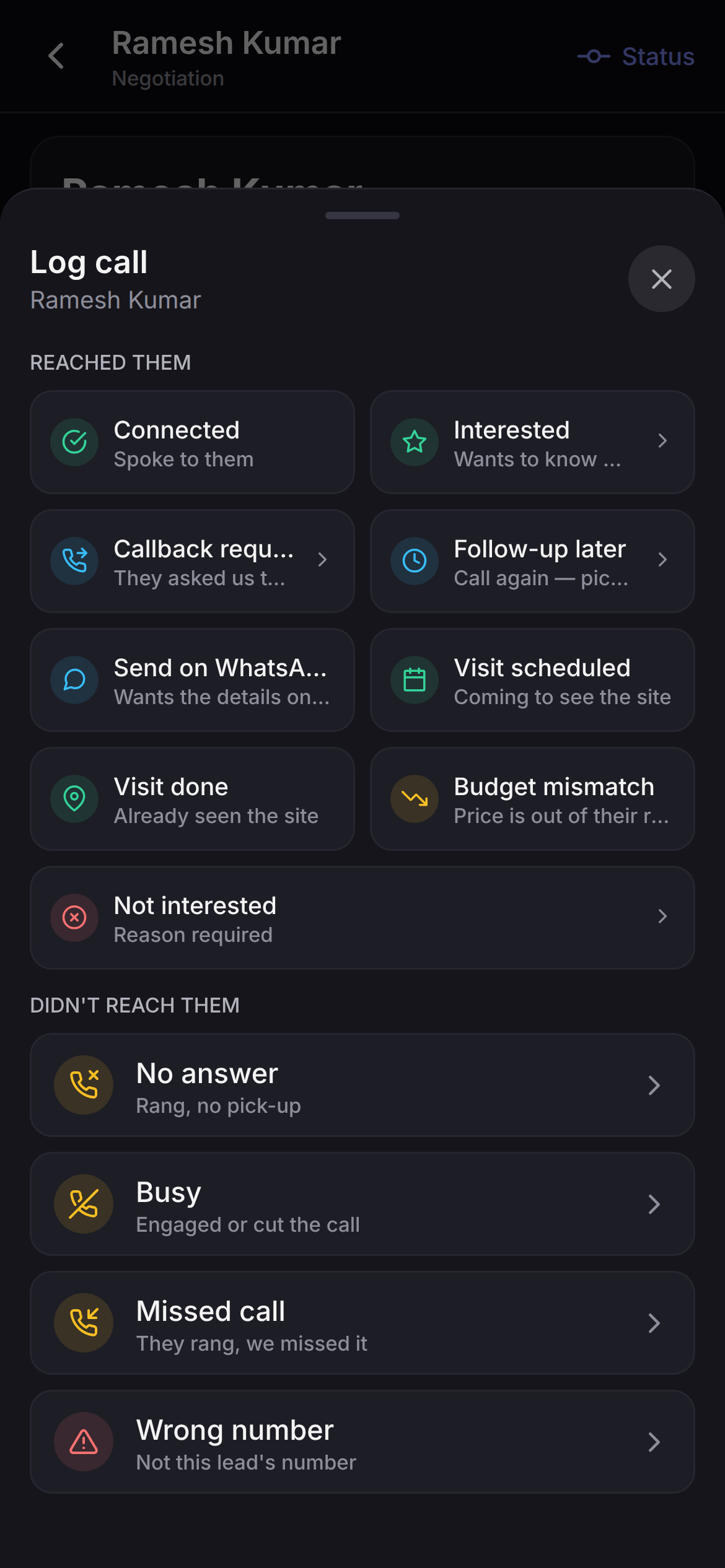
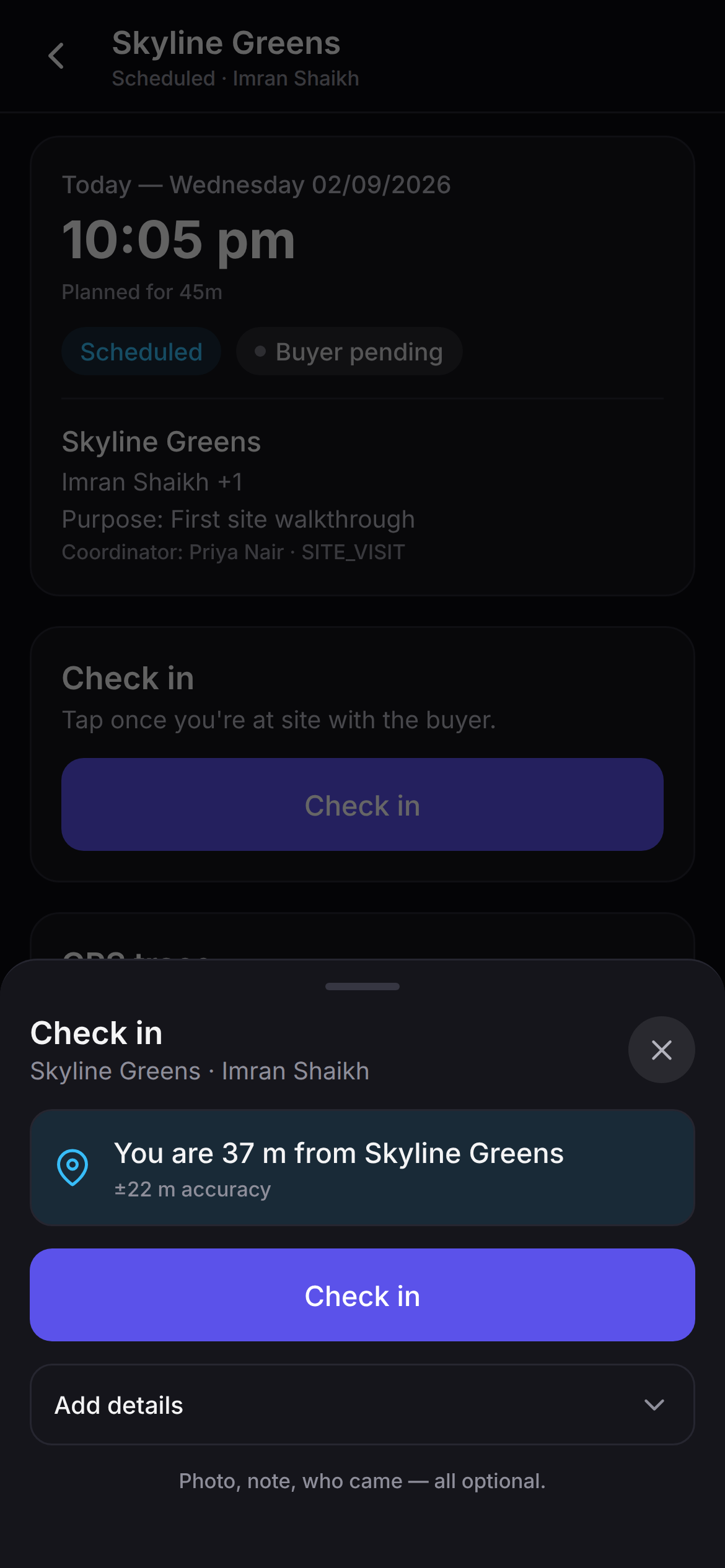
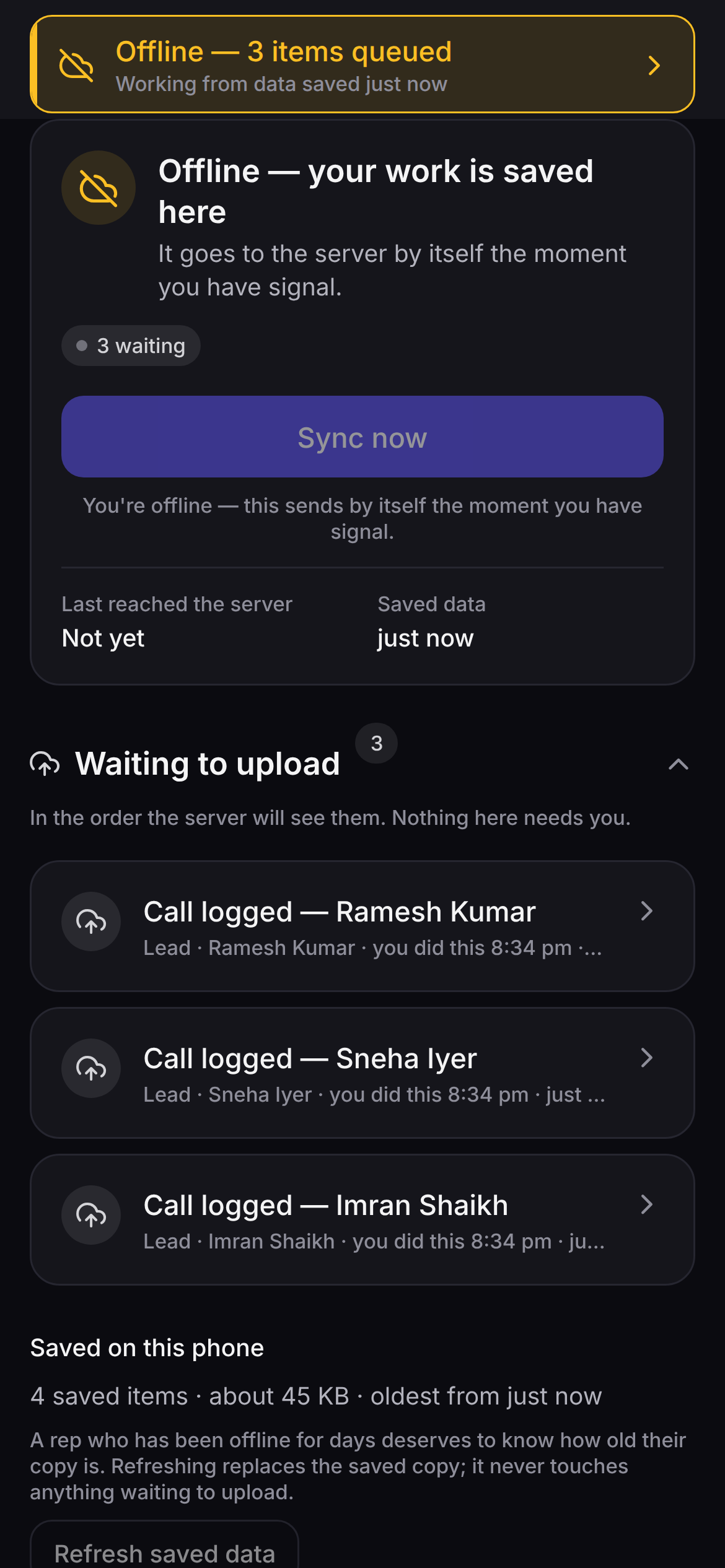
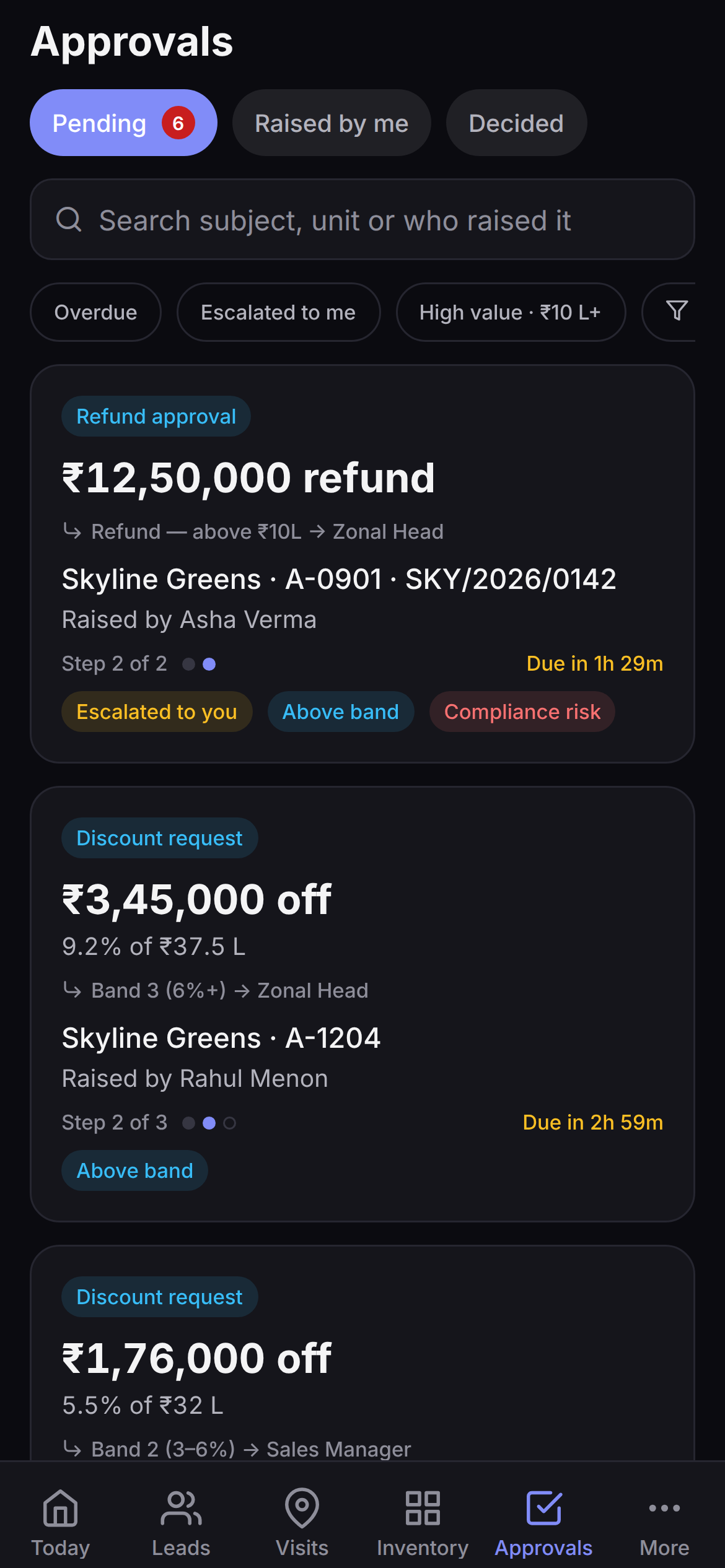
These are dark-mode captures; the app follows whatever your phone is set to, and every screen shown is in the build above — this APK was cut from the same code on 02/09/2026, so the app you install is the app in these pictures. The previous build on this page was three days older than them, and said so; this one does not have to.
Three taps, and one alarming-looking prompt.
Android warns you about anything installed outside the Play Store. Here is exactly what it asks, and why.
Tap Download the APK
49.5 MB, straight from our own server. Your browser will ask you to confirm a download of a file type it does not usually handle — that is the package installer, and it is the normal path for an app that did not come from a store.
Allow this one install
Android asks whether to allow installs from your browser, and Play Protect may add a second warning because it does not recognise the signer. Neither is a verdict on the app; both are Android telling you it cannot vouch for where the file came from. The setting is per-app, so you can switch it back off afterwards.
Open it and sign in
The same email and password as the web app. Grant location when it asks — that is what puts a GPS check-in on your site visits. Nothing else is requested until you use the feature that needs it, and you can decline any of it and still work.
Is this on the Google Play Store?
No. There is no listing yet, and this particular file could not be published to one anyway — it is signed with a debug certificate rather than a release key. We are not going to put a date on the listing here, because a date on a marketing page is a promise and we do not have one to make.
When there is a listing, this direct download stays. An agent on a Saturday should not need a store review queue to get back to work.
Will it run on my phone?
If it runs Android 7.0 or newer and has a 64-bit ARM processor, yes — which covers every Android handset sold in India for years now.
It will not install on an emulator, on an older 32-bit phone, or on an x86 Chromebook. This build carries arm64-v8a code only, which is what keeps it to 49.5 MB instead of well over a hundred.
Why does Android say it is unsafe?
Because it did not come from the Play Store, and because the signature on it is a debug signature Android has no reason to trust. Both warnings are Android saying it cannot vouch for the file's origin — neither is an inspection of the app.
What you can check yourself is the file. The SHA-256 printed above is the hash of the exact bytes this URL serves, taken from the build they came from. If that is not a trade you want to make on a work phone, wait for the Play listing and use the web app in the meantime.
Can I use it on an iPhone?
No. There is no iOS build — not one in review, not one in beta. Android went first because that is what the field runs on, and it is still the only build there is.
On an iPhone, open the web app in Safari and it works properly: the full pipeline, site visits, approvals, dashboards and reports. What you lose is the offline queue and the GPS check-in, which need the installed app.
Do I need a Saudaflow account first?
Yes. The app signs in to an existing workspace with the same email and password as the web app; there is no sign-up on the phone and no self-serve trial. A workspace is created with you on a short call, with your projects, your team and your pipeline in it before the call ends.
If you already have an account and cannot remember the password, reset it from the sign-in screen — it opens the same reset page the web app uses.
Does it read my call log or my contacts?
No, and it never asks for either permission. Google Play only allows call-log access for an app that is your phone's dialler or holds a written exception, and we decided not to ask for it on behalf of every person who uses this product. Nothing about your phone's own call record changes; what changes is what Saudaflow can see of it, which is nothing.
Instead, you dial from the lead card and the outcome sheet opens when you return. Two taps to log the call. The time you were away is shown as an estimate, marked as one, and only becomes a duration if you correct it.
Does it work without signal?
Yes — that is most of the reason it exists as an installed app rather than a website. In basement parking or on a site with no bars, the day you already loaded stays readable, and call outcomes, visit check-ins, feedback and voice notes queue on the phone. A banner tells you how many are waiting and how old the saved copy is.
The queue sends itself the moment signal returns. If the record changed on the server while you were away, the clash is flagged for you to decide — nothing is overwritten silently, in either direction.
How do I get the next version?
You come back to this page and install it over the top. This build cannot update itself — over-the-air updates are switched off in it — so there is no silent upgrade and no nag screen.
One exception, and it is worth knowing now: when we move to a build signed with our real release key, Android will refuse to install it over this one. That changeover is uninstall, then install, and uninstalling clears what the app saved on the phone. Sync anything still waiting in the queue before you do it.
The app is the field half. The workspace is the product.
A build sitting on your phone with nothing to sign in to is a wasted evening. We set up the workspace, the projects and the team with you on one call — then you install this on the way out and check in at your next site visit.
Saudaflow is sold through a short call — we set your workspace up with you. No card, no self-serve signup.